 What's My Set
How to Log Strength Workouts to Apple Health
If your session lives in your head (or a notebook), it never counts toward your activity trends, your training load, or your rings.
What gets logged
With the Pro upgrade, What's My Set can optionally save every completed workout to Apple Health with:
| Data | iPhone / iPad | Apple Watch |
|---|---|---|
| Workout duration | ✓ | ✓ |
| Workout type | ✓ | ✓ |
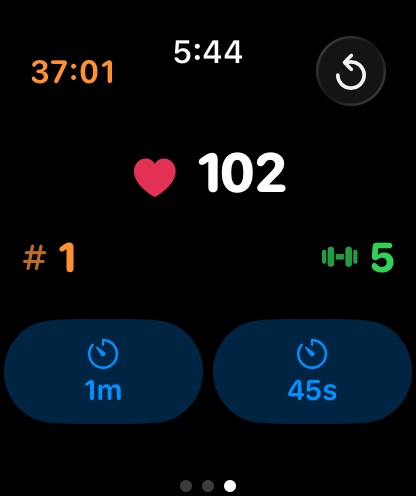
| Heart rate | No | ✓ (live during the workout) |
| Energy burned | No | ✓ |
How to set it up
- Download What's My Set on iPhone (and its Apple Watch app installs alongside).
- Turn on Health logging in the app's settings (part of the Pro upgrade) and grant Health access when asked. Logging is opt-in; nothing is recorded until you say so.
- Train as usual. Count sets, run rest timers, and/or do your Tabata/EMOM intervals.
- End the workout. The session is saved to Apple Health. Wear your Apple Watch and you'll have the option to see live heart rate during the workout, plus heart rate and energy burned can be saved to Apple Health.
The privacy part (it's short)
Your workout data goes to Apple Health on your device and nowhere else.
Why log strength workouts at all?
- Consistency you can see. Weeks of training show up in Health trends.
- Honest effort data. Watch-measured heart rate and energy burned tell you what those supersets actually cost, and whether your rest periods are as long as they feel.
- One source of truth. Cardio, lifting, walking: all in the same place.
Make your training count
Download What's My Set and let Pro send every session to Apple Health, with your sets counted and your rest timed along the way.
 Free set counting · Health logging with Pro